IAM 101: Identify, Authenticate, Authorize, Account
Prove It Once: What Kerberos Taught Me About Identity and Access Management Part of my Identity and Access Management study notes, from the CIA triad to Kerberos. Key takeaways IAM…
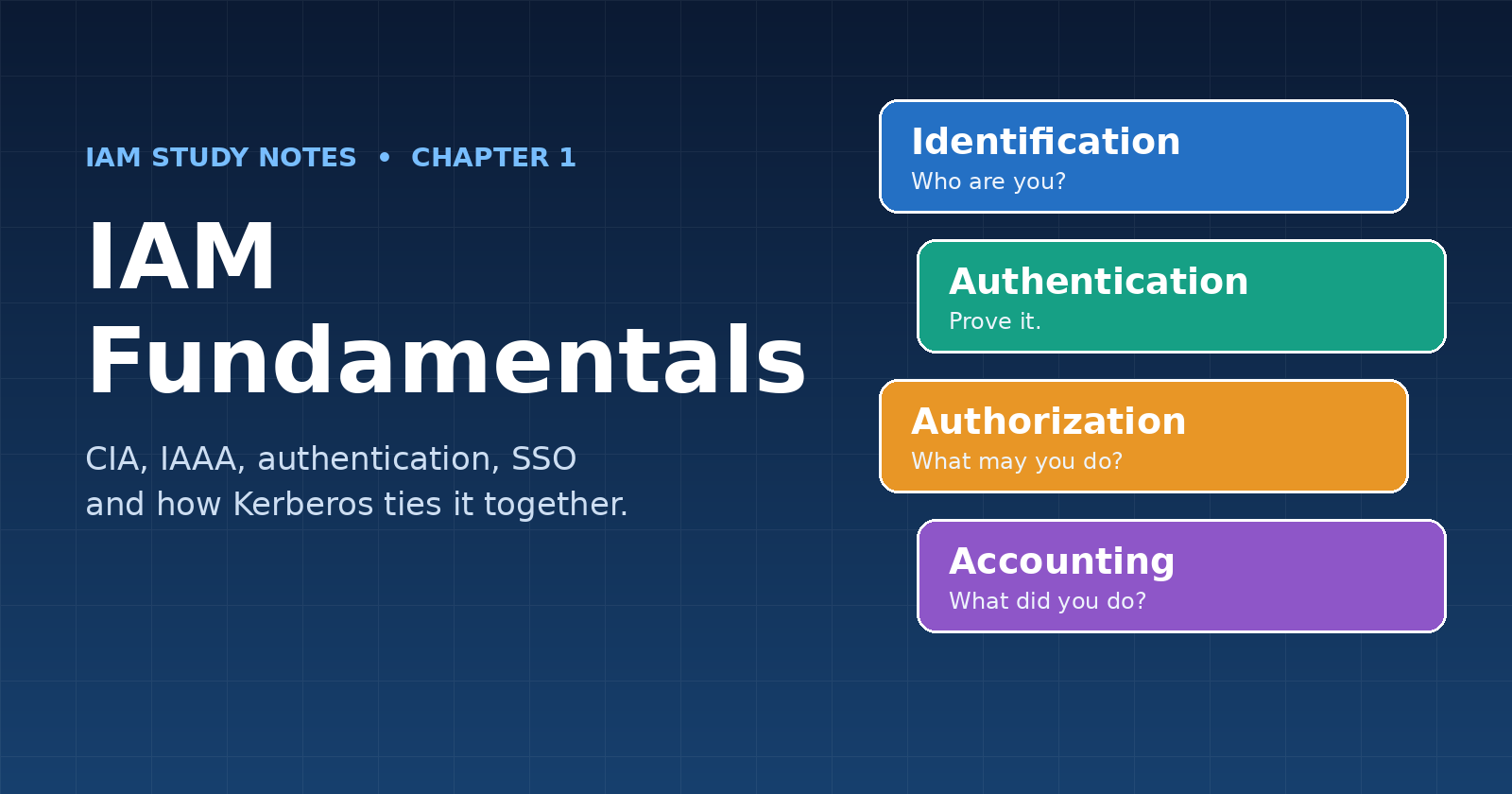
Prove It Once: What Kerberos Taught Me About Identity and Access Management
Part of my Identity and Access Management study notes, from the CIA triad to Kerberos.
Key takeaways
- IAM exists to make sure the right people and things get the right access to the right resources at the right time
- Every access decision rests on four steps: identify, authenticate, authorize, account
- Least privilege, separation of duty and job rotation are design principles, not paperwork
- Strong authentication means more than "a complex password": it means factors, sensible policy and the right protocol
- Kerberos shows how one clever protocol lets you prove identity once and reuse it safely
Background
IAM is one of the most fundamental capabilities in cybersecurity. My course splits it into four domains:
- Identification, Authentication, Authorization and Accounting (IAAA)
- Privileged Access Management (PAM)
- Identity Governance and Administration (IGA)
- Data Governance and Protection
Chapter 1 covers the first one, IAAA. This post summarizes the whole chapter in the order I'd teach it: the principles first, then the authentication building blocks, then federation, and finally Kerberos, which pulls several of those ideas together.
1. The foundation: the CIA triad
Before controlling access, you need to know what you're protecting. Information security rests on three principles:
- Confidentiality. Only authorized parties can see the data (PII, PHI, intellectual property). Typical controls: encryption, separation of duty, least privilege.
- Integrity. Data and messages can be trusted. This covers authenticity (it really came from who it claims), accuracy (it wasn't modified by someone unauthorized) and non-repudiation (senders and recipients can't deny what they sent or received).
- Availability. Systems and data are there when needed: redundancy and failover, uninterrupted access for users, and disaster recovery.
A good way to practice: take any attack and ask which principle it hits. A virus that corrupts files, for example, is primarily an attack on integrity.
2. IAAA: the four steps of every access decision
IAAA is the set of controls that governs access to digital resources, plus a way to audit how they're used.
| Step | Question it answers | Example |
|---|---|---|
| Identification | Who are you? | Typing a username |
| Authentication | Can you prove it? | Password, token, fingerprint |
| Authorization | What are you allowed to do? | Read-only access to a share |
| Accounting | What did you do? | Logs and audit trails |
Skipping any step breaks the chain. Without accounting you can't investigate; without authorization, authentication is just a locked front door with an open warehouse behind it.
3. Principles that shape who gets access
Three concepts show up everywhere in IAM design:
- Least privilege ("need to know"). Share only the minimum information, and only with those who need it.
- Separation of duty. Critical roles shouldn't sit with a single person, which removes the opportunity for fraud or abuse by one individual.
- Job rotation. When one person holds the same job for a long time, the risk of fraud and collusion grows. Rotation helps detect and prevent errors and fraud.
I think of these as the "why" behind every permission setting I configured in the lab later.
4. Authentication: proving who you are
Authentication factors fall into groups:
- Something you know: passwords, passphrases, PINs
- Something you have: a hardware token, phone, authenticator app
- Something you are: biometrics
- Something you do: typing rhythm, location
Using one group is single-factor; adding a second group is two-factor; layering more is multi-factor. The NIST guidance referenced in my course is SP 800-63B.
Passwords. The classic advice is to use at least 8 characters, avoid known or historical passwords, and prefer passphrases (a sequence of words). Current NIST guidance leans further toward length and screening against known-bad passwords rather than forced complexity and frequent rotation.
Tokens. Synchronous tokens are time-based and synced with a server (RSA tokens, Google Authenticator). Asynchronous ones aren't synced, such as codes sent by SMS or email. SMS is better than a password alone, but it's the weaker kind of second factor.
Biometrics. Fingerprint, retina, iris and facial recognition are the physical methods; keystroke dynamics, dynamic signatures and voiceprints are behavioral. Biometric systems are judged by three rates:
- False reject rate (FRR): an authorized user is turned away. Bad user experience.
- False accept rate (FAR): an unauthorized person gets in. A real security risk.
- Crossover error rate (CER): the point where FRR and FAR are equal. The lower it is, the more accurate the system.
5. Federation, SSO and SAML
Identity federation connects separate identity systems, so one trusted source can vouch for users across many services.
- The Identity Provider (IdP) stores identities and authenticates users (Okta and Microsoft ADFS are examples).
- The Service Provider (SP) is the application the user wants to use, for example a cloud financial platform.
- SAML is an XML-based framework that carries authentication and authorization between an SP and an IdP.
- Single Sign-On (SSO) lets a user authenticate once and access multiple applications.
The trade-off is worth remembering: centralizing credentials reduces how many places can leak them, but it also means one compromised account can unlock everything it federates to. That's the argument for pairing SSO with MFA.
6. Hands-on: the Active Directory lab
Chapter 1 ended with a lab where I built and tested a Windows domain (Windows Server 2016 and Windows 10):
- Created organizational units (OUs) and a standard domain user, then compared what that user could and couldn't do against an admin (for example, trying to create a new user)
- Linked a Group Policy to my OU and deliberately set a weak password policy (6 characters, no complexity, no history), then tightened it to 8 characters with complexity and a history of 5, testing which passwords were accepted at each stage
- Configured an account lockout policy (3 invalid attempts, 30-minute lockout), triggered it, and unlocked the account as admin
Seeing a weak policy accept a bad password, then watching the strong one reject it, made the theory stick.
7. Finale: Kerberos
Everything above comes together in Kerberos, the network authentication protocol behind most Windows domain logins, including the one in my lab. It's designed for networks you can't trust, and its core idea is: prove who you are once, then use tickets instead of passwords.
Every few years someone calls Kerberos obsolete, yet it is still very much alive in hybrid cloud and enterprise data environments, because most organizations run on-prem Active Directory alongside cloud identity, and plenty of file servers, databases and data platforms still authenticate with it.
How it works
Three parties are involved. The Key Distribution Center (KDC) runs the Authentication Service (AS) and the Ticket Granting Service (TGS); the third is the target service you want to reach.
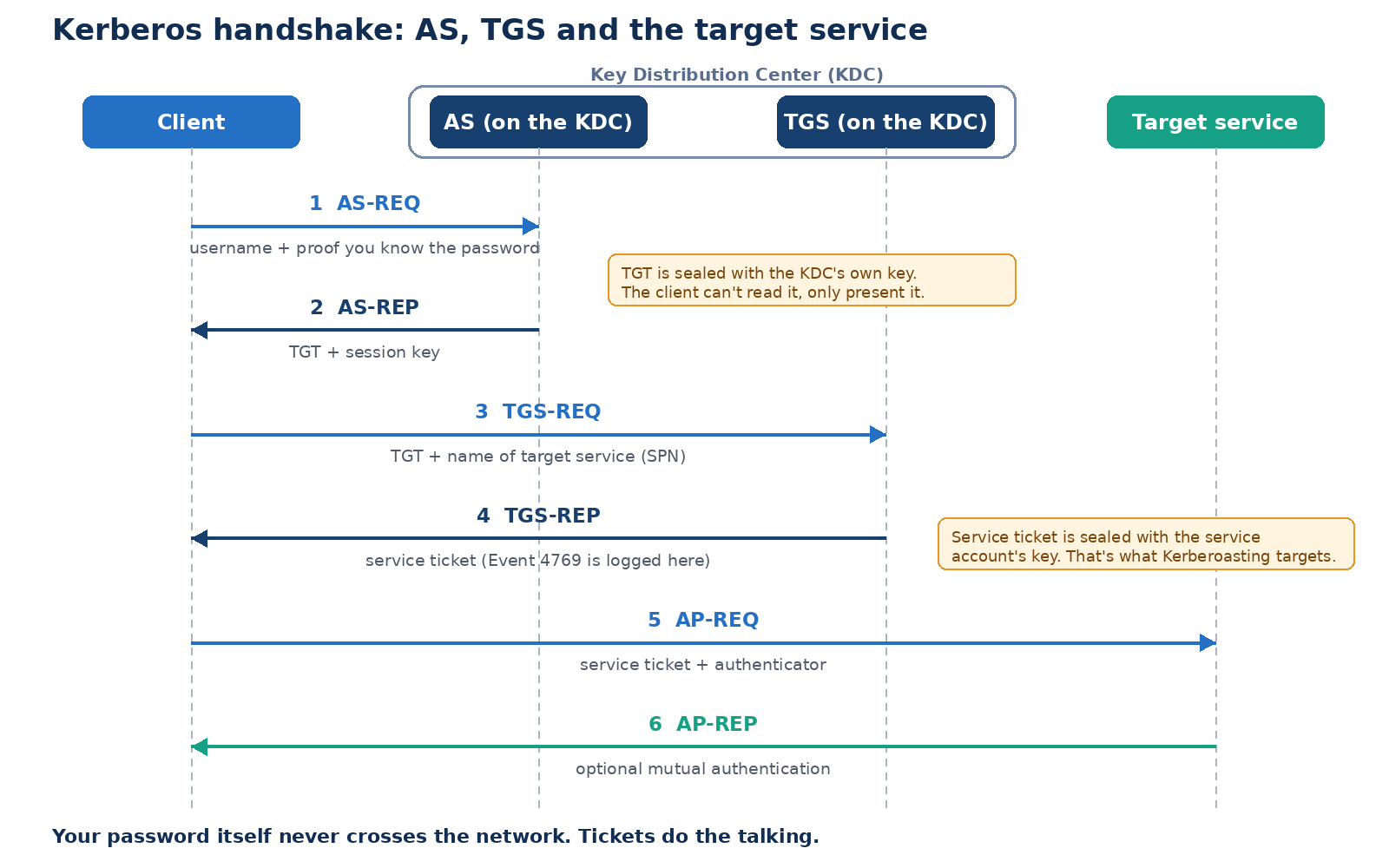
- AS-REQ. The client asks the KDC for access, proving it knows the user's secret without sending the password itself.
- AS-REP. The KDC replies with a Ticket Granting Ticket (TGT), sealed with the KDC's own key. The client can't read it, only store and present it. It's valid for a limited time (hours; Active Directory defaults to 10).
- TGS-REQ. To reach a resource such as a shared folder, the client sends the TGT back and names the service.
- TGS-REP. The KDC validates the TGT and issues a service ticket, sealed with the target service's key.
- AP-REQ. The client presents the service ticket to the server.
- AP-REP. The server decrypts it with its own key, confirms it's valid, and lets the client in. It can optionally prove its identity back (mutual authentication).
An analogy from my course: you show your driver's license at a data center desk, get verified once, and receive an ID card that fast-tracks you in from then on. That ID card is the TGT.
From my lab: on a domain-joined Windows machine, run
klistto see the TGT and service tickets cached in memory. (Insert your screenshot here.)
Where it still lives today
- Hybrid identity. Microsoft Entra Cloud Kerberos lets cloud sign-in produce Kerberos tickets for on-prem resources, so the cloud gets you in and Kerberos does the last mile.
- Big data platforms. Secured Hadoop and Spark clusters authenticate services using principals and keytabs (files holding long-term keys). These jobs often feed ML training data, and a leaked keytab is effectively a password in file form.
- Enterprise AI apps. A retrieval (RAG) service often needs to fetch documents as the user, so answers only use content that person may see. Against Kerberos-protected backends, constrained delegation makes that possible for specific, approved services only.
Where it gets attacked, and how to defend
The service ticket in step 4 is encrypted with the service account's secret, so an attacker with any valid domain account can request tickets and try to crack them offline. This is Kerberoasting. And delegation set too broadly lets a service impersonate users, which is a least-privilege failure at protocol level.
Four defenses:
- Use Group Managed Service Accounts (gMSAs). Long, random, automatically rotated passwords make offline cracking impractical.
- Enforce AES and retire RC4. Require AES-128/256 on service accounts, and audit what still depends on RC4 first.
- Monitor Event ID 4769. It's logged for every service ticket request. Watch for RC4 requests (encryption type
0x17) in an AES environment, and for one account requesting tickets for many services quickly. - Treat keytabs and delegation as crown jewels. Store keytabs in a secrets manager, scope each to one service, rotate them, prefer constrained or resource-based delegation, and mark privileged accounts "sensitive and cannot be delegated."
What I learned
- IAM is a chain: CIA tells you what to protect, IAAA tells you how access decisions are made, and every link needs to hold
- Least privilege, separation of duty and job rotation limit the damage when something goes wrong
- Authentication quality comes from the factors you combine and the policy you enforce, which the lab made very concrete
- Federation and SSO trade many credentials for one, so they need MFA behind them
- Kerberos is a great case study: strong by design, but only as strong as the service accounts, encryption types and delegation settings around it
Next up, Chapter 2: Privileged Access Management, where least privilege gets applied to the most powerful accounts in the environment.
Spotted something wrong, or want to talk security? Reach me at tpjn02@gmail.com or try my AI twin.